5 Hidden Features of the Zowie Za13 B You Must Know About
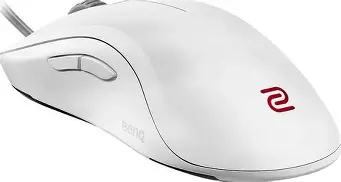
The landscape of competitive gaming peripherals is often dominated by flashy RGB lighting, complex software suites, and ultra-high polling rates that promise the world but often deliver diminishing returns. In this crowded market, BenQ’s Zowie brand has maintained a stoic commitment to a "performance-first" philosophy. The Zowie ZA13-B, the smallest entry in the ZA series, represents the pinnacle of this design language. While it may appear modest to the uninitiated, this mouse is a surgical tool designed specifically for the rigors of professional esports. Beyond its iconic high-hump profile and symmetrical shape, there are several nuances to its construction and internal logic that many users overlook. This article explores five hidden features and design choices of the Zowie ZA13-B that elevate it from a simple peripheral to a competitive necessity.
To understand the ZA13-B, one must first understand the context of its design. The ZA series was built for gamers who prefer a "palm-plus-claw" hybrid grip or a full palm grip on a smaller chassis. By placing the highest point of the mouse toward the rear, Zowie provides significant support to the lower portion of the palm, offering a locked-in sensation that few other mice can replicate. However, the "B" revision introduced several stealthy updates that changed how the mouse interacts with modern surfaces and hardware. Let’s dive into the technical depths of this enthusiast favorite.
1. The Driverless Implementation of "Plug-and-Play" Polling and LOD
In a world where every peripheral requires a 200MB software installation that stays resident in system memory, Zowie’s commitment to being driverless is a massive, albeit hidden, feature for serious LAN competitors. The ZA13-B handles all of its advanced configurations through physical button combinations during the "plug-in" phase. While most users know about the DPI button on the bottom, few realize that the Lift-Off Distance (LOD) is also fully adjustable without software.
This is critical for gamers who transition between different mousepad materials. A glass pad and a heavy cloth pad reflect light differently, which can cause the 3360 sensor to track poorly or jitter if the LOD isn't optimized. By holding down specific combinations of side buttons and the main mouse buttons while plugging the mouse into a USB port, users can cycle through "Low," "Medium," and "High" LOD settings. This hard-coded flexibility ensures that your muscle memory remains consistent regardless of the surface you are playing on, and it guarantees that no background software will ever cause a frame drop or input latency spike during a match.
2. Anatomical Optimization of the "High Hump" for Vertical Micro-Adjustments
Many reviewers discuss the Zowie ZA13-B hump in terms of comfort, but its hidden feature is actually its role in "verticality." In tactical shooters like CS:GO, Valorant, or Rainbow Six Siege, horizontal aim is often prioritized, yet vertical micro-adjustments—such as adjusting for a headshot on a player at a different elevation—are where many players struggle. The ZA13-B’s rear-positioned hump acts as a pivot point against the palm.
Because the hump is high and focused at the back, it creates a pocket of space between the front of the palm and the mouse buttons. This allows for a unique range of motion: you can pull the mouse into your palm using your fingers for downward adjustments without the base of the mouse hitting your wrist prematurely. This "hidden" mechanical advantage allows for more precise vertical tracking compared to flatter mice like the FK series or the EC series, where the palm often feels more "static" against the top shell. This anatomical synergy is why the ZA13-B remains a cult favorite among entry-fragging professionals who need to clear corners and vertical angles at high speeds.
3. The Revised 16-Step Optical Scroll Wheel
One of the most polarizing features of Zowie mice is the scroll wheel, but in the ZA13-B, the 16-step implementation serves a hidden functional purpose that actually benefits competitive play over general browsing. Unlike the 24-step or infinite scrolls found on productivity mice, the ZA13-B wheel uses an optical encoder with very distinct, tactile notches. This is specifically designed to prevent accidental scrolls—a common issue in high-intensity gaming where "Mouse Wheel Up" or "Down" is often bound to "Jump" or "Weapon Switch."
The "hidden" benefit here is the mechanical reliability of the optical switch. Traditional mechanical encoders use physical contact points that wear down over time, leading to "ghost scrolling" or the wheel losing its tension. By using light-based detection (optical), Zowie ensures that each of those 16 steps remains just as stiff and deliberate on day 1000 as it was on day 1. For players who use the scroll wheel for precise bhop timing or ability deployment, this intentional rigidity is a feature, not a flaw, providing a level of physical feedback that prevents mis-inputs during stressful clutch scenarios.
Looking for the best Electronics deals on Amazon?
See Deals →4. Weight Re-Balancing Without "Holes"
The "B" iteration of the ZA13 saw a reduction in weight compared to the original ZA13, yet Zowie achieved this without resorting to the "honeycomb" or perforated shell design that has become a trend. The hidden feature here is the structural integrity and weight distribution. By thinning the internal walls of the chassis while maintaining a solid outer shell, Zowie created a mouse that is light (approximately 75 grams) but feels remarkably robust.
More importantly, the weight distribution is shifted toward the center-front. In the original ZA13, some users felt the high hump made the mouse "back-heavy," which could cause the front to lift slightly during aggressive swipes. The ZA13-B refined the internal mounting of the 3360 sensor and the PCB to ensure that the center of gravity is perfectly aligned with the sensor's position. This ensures that when you lift and reset the mouse, it remains perfectly parallel to the pad, preventing "sensor tilt" which can cause your crosshair to drift during rapid repositioning.
5. The Upward-Angled Cable Attachment
A subtle but genius design choice on the ZA13-B is the angle at which the cable exits the mouse. Most mice have a cable that comes out flat, parallel to the mousepad. This often leads to the cable dragging against the pad right at the front of the mouse, creating friction and "cable tug," even when using a mouse bungee. The ZA13-B features a cable stress relief that is angled upward by several degrees.
This hidden geometry change ensures that the first few inches of the cable are naturally suspended in the air. When combined with a bungee, it creates a "wirele…
Performance Analysis: Why the ZA13-B Still Matters
The Zowie ZA13-B utilizes the PixArt 3360 sensor, which many consider the "gold standard" of tracking. While newer 3389 or 3395 sensors offer higher maximum DPI, the 3360 is beloved for its lack of "smoothing" or "jitter" at the DPI levels actually used by pros (typically 400, 800, or 1600). In the ZA13-B, the implementation is flawless. There is no measurable pixel skipping or hardware acceleration, which means your aim is a 1-to-1 reflection of your hand movement.
Furthermore, the coating of the ZA13-B is a specialized matte finish that reacts to the heat of the hand. While it might feel slightly slippery when first touched with cold hands, as the palm warms up, the coating becomes remarkably tacky, providing a level of grip that rivals specialized grip tapes. This "dynamic grip" is a hallmark of Zowie's materials science, ensuring that even during long, sweaty tournament sets, the mouse stays firmly in your grasp.
Pros and Cons of the Zowie ZA13-B
- Exceptional Shape Consistency: The high-hump design provides unmatched palm support for small-to-medium hands, reducing hand fatigue during long sessions.
- Driverless Reliability: All settings are stored on-board, making it the perfect choice for LAN players or those who hate bloatware.
- Tactile Feedback: The Huano switches used for the main buttons are stiffer than standard Omrons, which helps prevent accidental clicks and provides a more meaningful click sensation.
- Build Quality: The solid shell design means zero creaking or flexing, even under extreme pressure.
- Simplicity: No distracting lights or unnecessary buttons; every millimeter of the mouse is dedicated to performance.
- Stiff Cable: The rubberized cable is more durable than braided versions but lacks the flexibility of modern "paracord" style cables.
- Wheel Sound: The 16-step optical wheel is quite loud, which might be a distraction in quiet environments.
- Niche Shape: The rear hump is aggressive; if you prefer a fingertip grip or have very large hands, the ZA13-B might feel restrictive.
- DPI Limited: Fixed intervals (400/800/1600/3200) mean you cannot set a specific DPI like 750 or 1000.
Zowie ZA Series Comparison Table
| Feature | ZA11-B | ZA12-B | ZA13-B |
|---|---|---|---|
| Size Class | Large | Medium | Small |
| Weight | ~82g | ~78g | ~75g |
| Length | 128mm | 124mm | 121mm |
| Width (Middle) | 62mm | 60mm | 58mm |
| Height (Highest Point) | 40mm | 39mm | 38mm |
| Sensor Type | PixArt 3360 | PixArt 3360 | PixArt 3360 |
Buying Guide: Is the ZA13-B Right for You?
Choosing a gaming mouse is a deeply personal decision, often boiling down to hand size and grip style. The ZA13-B occupies a very specific niche. Before purchasing, consider the following factors to ensure it aligns with your playstyle.
Hand Size Considerations
The ZA13-B is a small mouse. Ideally, it is suited for hands that measure between 16cm and 18.5cm in length. If your hands are larger than 19cm, you will likely find your fingers overhanging the front buttons, or you will be forced into a very aggressive claw grip that might cause cramping. Conversely, for those with smaller hands who struggle to find a mouse that doesn't feel like a "brick," the ZA13-B is often a revelation.
Looking for the best Electronics deals on Amazon?
See Deals →Grip Style Synergy
If you are a Palm Grip user, the ZA13-B will feel like it was molded for your hand. The hump fills the void in your palm, giving you maximum control. If you are a Claw Grip user, the rear hump provides a stable anchor point for the bottom of your hand while your fingers arch over the buttons. However, if you are a Fingertip Grip user (where your palm never touches the mouse), the ZA13-B is likely the wrong choice; the high hump will obstruct your movement, and you would be better served by the Zowie FK series.
The Mechanical "Heavy" Click
Buyers should be aware that Zowie uses Huano switches, which are notoriously "heavier" than the Omron switches found in many mainstream mice. This requires slightly more actuation force. This is a deliberate choice to prevent accidental clicks when your hand is resting heavily on the mouse (a common issue with high-hump mice). If you prefer extremely light, hair-trigger buttons, there may be a learning curve. However, for those who want to "feel" every shot they take, the Huano switches provide some of the best tactile feedback in the industry.
Maintenance and Longevity
Because the ZA13-B is driverless and uses an optical scroll wheel, it is one of the most durable mice on the market. There is very little that can go wrong with it from a software or firmware perspective. To keep it in top condition, focus on the mouse feet (skates). Zowie includes a replacement set in the box. Over time, these large teflon feet will wear down; replacing them every 6–12 months (depending on your pad's abrasiveness) will maintain the "gliding" sensation that the ZA series is known for.
The Competitive Edge of Functional Minimalism
In an era where "more" is often equated with "better," the Zowie ZA13-B stands as a testament to the power of "less." By stripping away the software, the lighting, and the superfluous buttons, Zowie has focused entirely on the ergonomics and the sensor implementation. The "hidden" features discussed—the adjustable LOD, the vertical micro-adjustment space, the optical wheel, the weight balancing, and the angled cable—are all evidence of a design team that spends as much time watching professional replays as they do in the lab.
The ZA13-B is not just a mouse; it is a specialized instrument. It demands that the user understands their own grip and their own hardware. For the gamer who wants a tool that stays out of the way and performs with absolute predictability, the ZA13-B remains one of the most respected shapes in the history of esports. It reminds us that at the highest levels of competition, the most important feature is not what the mouse can do for you, but how it allows you to perform without limitation.
Whether you are a professional aiming for the podium or a dedicated enthusiast looking to improve your consistency, the ZA13-B offers a level of physical and technical refinement that is rarely matched. Its "hidden" features are the result of years of iterative feedback from the world’s best players, culminating in a device that is as much about the science of the human hand as it is about the technology inside the shell. In the end, the Zowie ZA13-B proves that true innovation often lies in the details that you don't see, but that you certainly feel every time you line up a shot.