Biggest Ls31 Wireless Buying Mistakes (And How to Avoid Them)
Wireless gaming headsets often get purchased with a single goal in mind—cut the cable, keep the immersion—and then judged harshly when real-life usage exposes trade-offs: comfort over long sessions, mic clarity in noisy rooms, console compatibility quirks, and the unglamorous reality of charging habits. The LucidSound LS31 Wireless (often written simply as Ls31 Wireless) is a good example of a headset that can make buyers genuinely happy—if they understand what it is designed to do and what it isn’t.
This article breaks down the most common buying mistakes people make with the LS31 Wireless, why those mistakes happen, and how to avoid them. It also includes a detailed analysis of the headset’s real-world behavior, a pros-and-cons list, an at-a-glance comparison table against common alternatives in its class, and a practical buying guide so readers can decide whether the LS31 fits their setup and expectations.
Quick Context: What the LS31 Wireless Is (and Isn’t)
The LS31 Wireless is primarily a gaming headset built around a low-latency USB wireless dongle experience rather than Bluetooth-first convenience. It emphasizes on-ear controls (notably separate game/chat mixing on the ear cups), a boom mic plus an integrated mic for different scenarios, and comfort for long sessions. It aims to be a living-room-and-desk headset: couch gaming, PC sessions, voice chat, and casual media listening.
It is not a travel headphone, not an ANC commuter headset, and not a “one pairing to rule them all” Bluetooth device for switching between phone, tablet, and laptop without friction. Buyers who approach it as “wireless headphones that also work for games” can end up disappointed; buyers who approach it as “a gaming headset with thoughtful controls and low-latency wireless” tend to judge it more fairly and get better results.
Detailed LS31 Wireless Review & Real-World Analysis
Design & Comfort for Long Sessions
Comfort is where the LS31 tends to win points in day-to-day use. The ear cups are designed for over-ear wear, and the headset is generally suitable for multi-hour gaming sessions—exactly the scenario most buyers care about: a two-hour night with friends that turns into five, or a weekend raid that becomes an all-day event.
That said, a common real-world variable is fit stability. Some users experience a looser seal than expected, especially if they wear glasses or prefer a stronger clamp force. This matters because the seal affects perceived bass, isolation, and how loud the headset needs to be to “feel” immersive in a room with background noise (a fan, AC, roommates, or a console in a shared space).
Controls & Why They Can Be a Love-or-Hate Feature
The LS31’s signature feature is its cup-based control system—including separate adjustments for game volume and chat volume. In real-world use, this can be excellent: in a noisy match, a player can quickly raise voice chat without blowing out the game mix, or lower chat when a teammate’s mic is peaking. For console and PC gamers who regularly use Discord or console party chat, this is a highly practical feature.
However, the same design can frustrate new owners. Without a short “learning period,” the controls can feel unintuitive—especially for buyers coming from headsets with traditional inline wheels and buttons. The mistake is assuming the first hour of use represents the long-term experience; most users who commit to learning the layout find it faster than fumbling for keyboard shortcuts or OS mixer sliders mid-match.
Wireless Performance, Latency, and the “Not Bluetooth” Surprise
Many buyers say “wireless” and mentally picture Bluetooth. The LS31’s wireless design is typically more aligned with gaming-grade low latency via a USB dongle. That’s a good thing for games and video because it helps avoid the classic problem: hearing footsteps late, or seeing lips move before dialogue lands.
The practical implication is that the LS31’s best experience often depends on what devices can accept that dongle and how the buyer plans to route audio. In a desk setup, that’s usually straightforward. In a living-room setup, it can be simple or complicated depending on the console generation, the TV, and whether the user expects a single headset to handle every source (console, smart TV apps, phone calls) without reconfiguration.
Microphone Behavior in Parties, Discord, and Shared Rooms
For most buyers, “mic quality” is less about sounding like a podcast and more about being consistently understandable: teammates can hear callouts, friends don’t complain about muffling, and the mic doesn’t pick up every keyboard click. The LS31’s mic approach (boom mic plus an integrated mic) is flexible, but expectations matter.
In typical gaming use cases—party chat with friends, Discord while streaming a game, or coordinating co-op—the mic can perform well enough to be useful. But there are also reports and measurements across the broader headset landscape suggesting the mic may not always compete with dedicated broadcast mics or the best-in-class gaming headset microphones. The key point for buyers: if the mic is the primary reason for purchase (for example, a remote-work headset first, gaming second), it’s wise to evaluate alternatives or plan on tweaking input gain, noise suppression, and placement.
Sound Signature for Games vs Music
The LS31 is tuned like many gaming headsets: it aims to make positional cues noticeable and keep energy in the mix. That often helps in competitive titles where clarity and separation matter more than perfectly flat frequency response. In real-world terms, buyers typically care about:
- Footstep and reload clarity in shooters
- Dialogue intelligibility in story-driven games
- Impact (explosions, engine roar) without overwhelming everything else
For music, many buyers expect a single headset to double as their daily listener. That can work, but the LS31 won’t necessarily satisfy listeners who want a neutral studio-style balance or crisp high-frequency detail. It can still be enjoyable—especially for bass-forward or energy-forward listening—but it should be evaluated as a gaming-first product.
Battery Life & Charging Reality
Battery claims are rarely the full story because real users change volume, use different platforms, and sometimes leave headsets powered on by accident. The LS31 is generally positioned as an “all-day session” headset, but the real buying mistake is treating it like a device that never needs a routine. The most satisfied owners tend to have a simple habit: plug it in after a long session, or charge it while doing something else (like downloading updates or watching TV).
Another common real-world pain point is charging convenience. If the buyer’s setup doesn’t have an easy charging cable nearby, the headset will get used less—not because it’s bad, but because it’s inconvenient. Wireless is only “freeing” when the charging habit is frictionless.
Biggest LS31 Wireless Buying Mistakes (And How to Avoid Them)
Mistake #1: Assuming It’s a “Universal Bluetooth Headset”
Why it happens: Many shoppers equate “wireless” with Bluetooth pairing across everything: phone, tablet, laptop, console, smart TV.
What goes wrong: The buyer expects easy switching, multipoint behavior, or simple phone pairing—and then discovers the LS31 experience is strongest with its dedicated wireless approach and gaming routing.
How to avoid it: Decide ahead of time what “wireless” you need. If the priority is low latency for games, a dongle-based headset can be a better fit. If the priority is phone calls and device hopping, a Bluetooth-first headset may be the smarter purchase.
Looking for the best Audio & Headphones deals on Amazon?
Shop Amazon →Mistake #2: Buying for a Loud Room While Expecting Strong Isolation
Why it happens: Over-ear headsets look like they should block noise well, and “closed-back” gets interpreted as “quiet outside world.”
What goes wrong: In real use—shared apartments, dorm rooms, family living rooms—buyers raise volume to overcome background noise, which can increase fatigue and reduce clarity.
How to avoid it: If the gaming environment is noisy, prioritize isolation (or active noise canceling) rather than assuming any closed-back gaming headset will handle it. Alternatively, pair the headset with environmental changes: turn down a fan, close a door, or reposition the console area.
Mistake #3: Underestimating How Much the Fit Affects the Sound
Why it happens: People expect sound quality to be fixed, like speakers. Headsets are different: seal, clamp, glasses, hair, and ear shape can materially change bass and perceived balance.
What goes wrong: The buyer reads one person’s “punchy bass” impression and experiences “thin bass” due to a weak seal, then assumes the headset is defective.
How to avoid it: Check fit during the return window. Make sure the ear pads seal evenly, and evaluate at normal listening levels. If the headset feels loose, consider whether the user’s head shape or glasses are likely contributors and whether a different model with a stronger clamp is preferable.
Mistake #4: Expecting “Stream-Ready” Mic Performance Without Any Tuning
Why it happens: Marketing language like “crystal-clear chat” makes buyers expect studio-like voice quality.
What goes wrong: Friends report the mic is too quiet, too sharp, or picks up room sound; the buyer gets frustrated and blames the headset.
How to avoid it: Treat headset mics as “communications mics.” For best results, adjust input gain in the console/PC settings, position the boom…
Mistake #5: Buying for Xbox Use Without Confirming the Chat Path
Why it happens: “Works with Xbox” is interpreted as “everything is wireless, including chat, with no additional cables.”
What goes wrong: The buyer ends up surprised by how chat is handled and whether a controller connection is required in their scenario.
How to avoid it: Before buying, map the exact intended workflow: console model, whether the user plays in party chat often, and whether they mind a controller cable for chat if required. Console ecosystems vary, and “compatible” does not always mean “identical experience across platforms.”
Mistake #6: Overpaying for a “New” Unit Without Checking What Version Is Being Sold
Why it happens: The LS31 has been sold through multiple retailers and bundles over time, and listings can be inconsistent.
What goes wrong: Buyers pay premium pricing for older stock, unclear “LE” variants, missing accessories, or refurbished units labeled poorly.
How to avoid it: Verify what’s included (dongle, cables, mic, any console-specific chat cable) and confirm the return policy. If pricing looks unusually high for an older model, it may reflect limited inventory rather than superior performance.
Mistake #7: Treating Wireless Range as the Primary Spec
Why it happens: Range is easy to understand and looks impressive on paper.
What goes wrong: Buyers prioritize “walk anywhere” range but ignore the bigger day-to-day factors: comfort, mic clarity, and whether the headset behaves well with their routing (TV, console, PC).
How to avoid it: Evaluate range in context. Most players need stable performance within one or two rooms—not across an entire house—while comfort and controls affect every minute of use.
Find top-rated Audio & Headphones products at great prices.
Shop Amazon →Pros & Cons of the LS31 Wireless
Pros
- Low-latency wireless experience well-suited to gaming and video, where sync matters
- On-ear controls that can make game/chat balancing fast once learned
- Comfort-focused design that tends to work well for long sessions
- Flexible mic options (boom mic plus integrated mic) for different scenarios
- Solid living-room usability for couch gaming when the audio path is set up correctly
Cons
- Not a Bluetooth-first “everything headset”, which can surprise buyers expecting phone-style pairing convenience
- Isolation can be limited depending on fit and environment, making it less ideal for noisy rooms
- Controls can feel confusing initially for users coming from simpler button layouts
- Mic quality expectations need to be realistic for streaming/voice-production use cases
- Console-specific chat behavior can be nuanced and should be verified for the buyer’s platform workflow
Comparison Table: LS31 Wireless vs Common Alternatives in the Same “Gaming Headset” Decision
This table is not about declaring a universal winner; it’s designed to help buyers avoid the most common mismatch: selecting a headset category that doesn’t align with the primary use case.
| Buyer Priority | LS31 Wireless Tends to Fit When… | Consider Another Option When… |
|---|---|---|
| Competitive gaming (low latency) | You want a wireless gaming experience that prioritizes responsiveness and simple game/chat control | You need Bluetooth multipoint or primarily use mobile devices for gaming and calls |
| Living-room console gaming | You play from a couch and value stable wireless plus quick adjustments mid-game | You need strong isolation in a loud household or want a single headset for TV apps + phone calls |
| Discord/party chat clarity | You want a convenient, built-in mic for normal team chat and casual voice communication | You need “broadcast-like” voice quality for streaming, recording, or professional calls |
| All-day wear comfort | You play long sessions and value comfort and ease of control more than maximum portability | You need a travel-friendly foldable headset or a lightweight on-the-go daily commuter pair |
| Music-first listening | You want enjoyable sound for casual music between games and don’t require a reference-neutral signature | You want an audiophile-leaning tuning, top-tier detail, or strong passive isolation for commuting |
Buying Guide: How to Choose the LS31 Wireless Without Regret
1) Define the Primary Use Case (Be Specific)
Most buying mistakes happen when the use case is vague: “gaming and stuff.” A clearer statement prevents category mismatch. Examples of good clarity:
- “PC gaming at a desk, Discord nightly, competitive shooters.”
- “PS/PC mix, couch gaming in a quiet room, occasional late-night TV.”
- “Xbox party chat with friends, living room shared with family noise.”
The LS31 generally aligns best with the first two. The third depends heavily on how noisy the room is and how the buyer will handle chat connectivity.
2) Check Comfort Variables: Glasses, Heat, Clamp Force Preferences
People who wear glasses often care about comfort more than they expect—until the second hour hits. The LS31 can be comfortable, but seal and pressure points vary by person. Buyers should think through:
- Glasses: do the temples break the seal or cause soreness?
- Heat: over-ear designs can trap warmth during long sessions
- Fit security: will the headset stay stable when leaning back, looking down, or shifting in a chair?
When possible, testing during a long session is the only meaningful comfort test. A five-minute try-on is rarely predictive.
3) Understand the Audio Controls Before Deciding They’re “Bad”
Because the LS31 emphasizes on-ear controls, buyers should plan a short acclimation period. The best practical approach is to set a baseline mix and then practice two adjustments:
- Raise chat slightly during a busy match without changing overall loudness
- Lower game slightly when teammates are calling out critical info
Once those are second nature, the control scheme can become a real advantage, especially for players who hate pausing to open system mixers.
4) Decide Whether Isolation Matters More Than Immersion
In a quiet room, moderate isolation may be “good enough,” and the LS31 can feel immersive without cranking volume. In a loud room, weak isolation forces the buyer into a volume war they can’t really win—leading to fatigue and poorer clarity.
Buyers who typically game with a fan running, share a space with others, or live near traffic should consider whether they actually need:
- Higher passive isolation (tighter seal, stronger clamp, thicker pads), or
- Active noise canceling (less common in traditional gaming headsets, but common in travel headphones)
5) Plan the Charging Habit Like It’s Part of the Product
Wireless headsets fail “emotionally” when they die mid-session. Avoiding that is often less about battery specs and more about routine. The most reliable, low-friction setups include:
- A dedicated charging cable at the desk or near the console
- A habit of charging after long sessions (or on a predictable schedule)
- A quick check before a planned group session
This is also where buyers should be honest about themselves: if they routinely forget to charge devices, a wired headset may cause fewer headaches.
6) Confirm the Full Accessory List for Your Platform
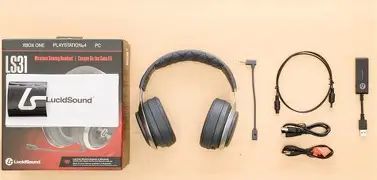
Buyers should verify what’s in the box and what’s needed for their specific chat and audio routing. The “wireless headset” phrase can hide details like:
- Whether voice chat requires a specific cable path on certain consoles
- Whether a dongle is required for the best experience
- Whether the boom mic is included (and how it connects)
Missing accessories are a common source of “this headset doesn’t work” complaints that are really “this listing didn’t include what the buyer assumed.”
7) Evaluate Sound Expectations: Competitive Clarity vs Music Fidelity
Buyers should decide what matters more:
- Competitive clarity (positional cues, separation, controlled bass), or
- Music fidelity (neutral tuning, detail, wide soundstage perception, isolation)
The LS31 can satisfy casual music listening and media, but it is most naturally judged by gaming priorities: clarity, convenience, and latency.
Conclusion
The LucidSound LS31 Wireless is a strong match for buyers who want a gaming-first wireless headset with low-latency behavior, a comfort-oriented build, and practical on-ear game/chat controls that shine in the middle of real sessions—when someone needs to hear teammates clearly without sacrificing the game mix. Most regret comes from a handful of predictable mismatches: assuming Bluetooth-style universality, expecting commuter-grade isolation, or expecting studio mic output without any tuning or workflow planning.
When buyers define their environment, confirm platform routing, and evaluate comfort and isolation honestly, the LS31 Wireless can feel less like a compromise and more like what it was designed to be: a convenient, responsive headset for long gaming nights where usability matters as much as sound.